
Menu

Red banner / bar on the athlete monitor

Red banner / bar on the athlete monitor
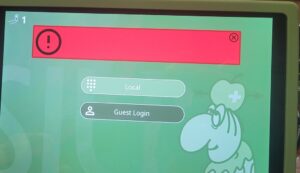
If a red banner / bar is displayed on an athlete monitor as shown, check the following:

  • Is the entire system running the same, latest software version?
  • The following athlete monitor versions must be checked specifically:
    • ‘athletemonitor.application’ and ‘limani-browser’
  • As well as Infrastructure and, if present, Kanopus and Themelia


If all devices are running the latest software version as per software.sius.com and the red banner / bar is still present, the entire system, including Infrastructure and the rack, must be completely restarted.
PLEASE NOTE: If UPS units are installed, these must also be switched off.

Privacy Overview

SIUS Support

This website uses cookies so that we can provide you with the best user experience possible. Cookie information is stored in your browser and performs functions such as recognising you when you return to our website and helping our team to understand which sections of the website you find most interesting and useful.

Data collected via forms directly on this page must always be obviously entered and agreed to by the user. The collected data will be used and processed exclusively in connection with the survey / request.

Technically Necessary Cookies

Technically necessary cookies enable navigation on our website. Without these cookies, the basic functions of our website cannot be fulfilled.

Analytics

This website uses Google Analytics to collect anonymous information such as the number of visitors to the site, and the most popular pages.

Keeping this cookie enabled helps us to improve our website.