


Menu
popupmotor.application
InvertShowHide
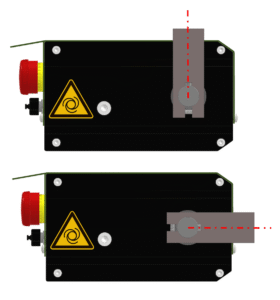
Mounting parameter to swap the ‘Show’ and ‘Hide’ positions of the arm. Default: ‘false’
Special installations or applications may require swapping the ‘Show’ and ‘Hide’ positions of the arm, which can be achieved using this setting. (Default: ‘Show’ is vertical, ‘Hide’ is horizontal)
| Arm position | InvertShowHide = false | InvertShowHide = true |
|---|---|---|
| Vertical | Show | Hide |
| Horizontal | Hide | Show |
ShowIsUp
Mounting parameter defining which movement lifts the target upwards. Default: ‘true’
The performance curves for the “Show” and “Hide” movements are slightly different due to varying forces. In normal cases (ShowIsUp = ‘true’), the target picture is lifted upwards during the ‘Show’ movement, which requires greater force. In special installations (e.g., ceiling mounting), the target image may be moved downwards during ‘Show’, in which case the ShowIsUp setting must be set to ‘false’.
SpeedControl
Preset motion ramps specify speed rather than power, therefore power is regulated. Default: ‘false’
By default for ‘Show’ and ‘Hide’ movements, predefined power ramps are used for the movement. Change in load (weight, wind, etc.) therefore leads to modified move speed. If the device should regulate the power to predefined speed ramps, this setting must be activated.
UpPercent
Allows the up movement power / speed to be reduced to a certain percentage (default = 100%)
If rapid switching between ‘Show’ and ‘Hide’ is not necessary, performance can be reduced. This results in a smoother transition and protects the mechanics, which increases the service life of the device. If Setting ShowIsUp is true, this setting only affects ‘Show’ movement.
Supported Range is 20% .. 100%.
DownPercent
Allows the down movement power / speed to be reduced to a certain percentage (default = 100%)
If rapid switching between ‘Show’ and ‘Hide’ is not necessary, performance can be reduced. This results in a smoother transition and protects the mechanics, which increases the service life of the device. If Setting ShowIsUp is true, this setting only affects ‘Hide’ movement.
Supported Range is 20% .. 100%.
HallSensorPosition
Defines the position (counts) where the magnet is measured by the Hall sensor. Default: 8
When the device is assembled correctly, the Hall sensor indicates position 8, so that the positions ‘Hide’ (pos. 0 / 414) and ‘Show’ (pos. 207) are at the dead center.